UCP
Serve your catalogue to AI shopping agents over the Universal Commerce Protocol, publish your profile on your own domain, and see which agents are searching it.
The Universal Commerce Protocol (UCP) is a standard way for AI shopping agents to find a store and read its products. The UCP screen lets you serve your project's catalogue to those agents and see which ones have called. Open UCP in the sidebar, under Workflow. Every kind of project has it.
What it is for
A shopping agent that is asked to find a product looks for stores it can query. With catalogue delivery on, an agent can:
- Search and compare your products. It reads the titles and descriptions you have approved in Rezolve Ai, not your raw import.
- Send the buyer to you. Rezolve Ai does not take payments, so an agent that wants to buy is handed to your own cart or product page. The sale always finishes on your store.
It is the same job as a product feed in the other direction. A feed is a file a channel fetches on a schedule. UCP is an address an agent queries when a shopper asks.
Turn on catalogue delivery
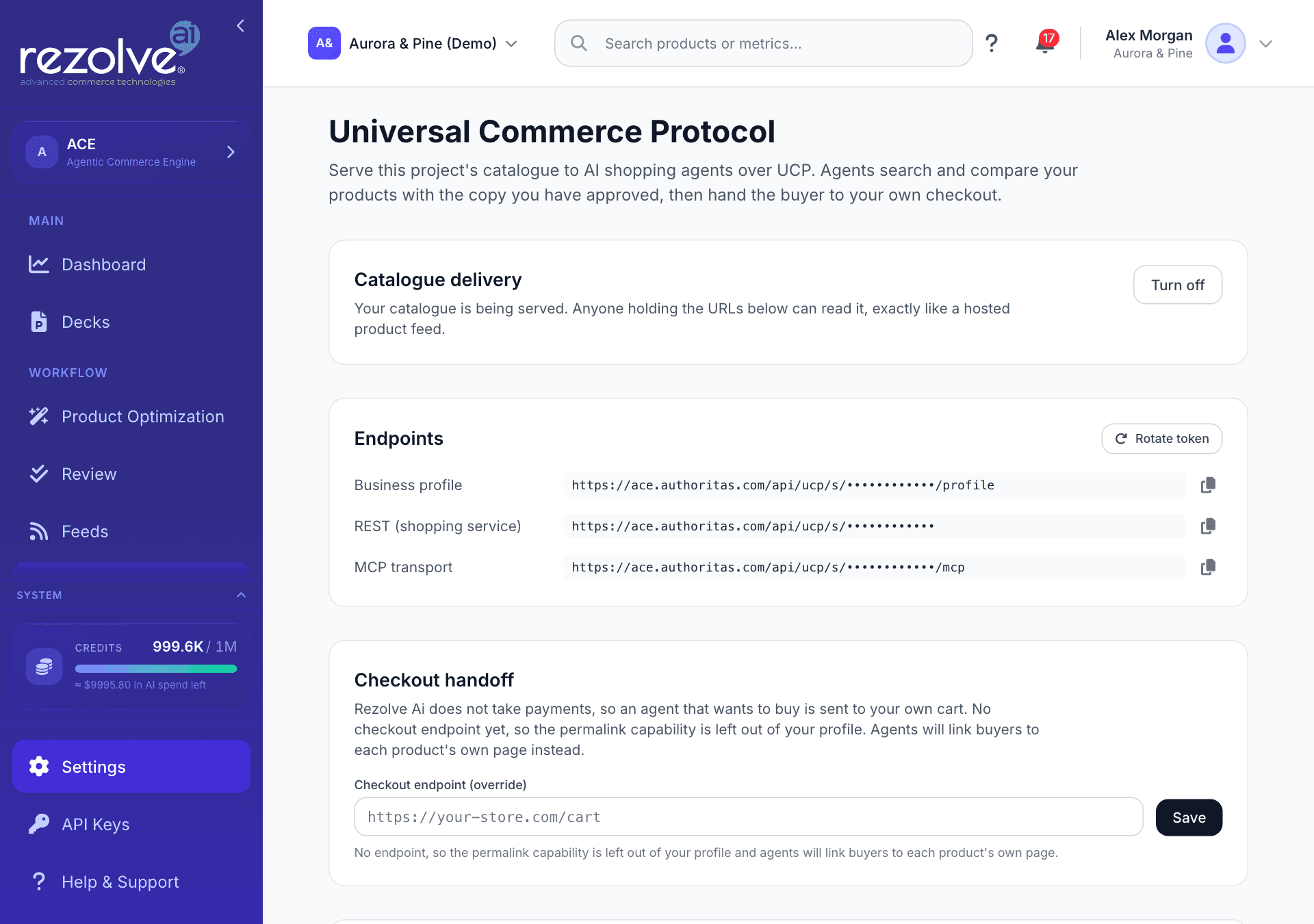
Delivery is off until you turn it on. While it is off, no agent can read the project's catalogue.
- Open UCP.
- Under Catalogue delivery, choose Turn on.
The screen then shows your endpoints, the checkout handoff and the profile to publish. Turn off stops serving the catalogue. Changing these settings needs edit rights on the project.
While delivery is on, anyone holding your UCP addresses can read the catalogue, exactly like a hosted product feed. Share them only with platforms you want to read it.
Endpoints
Endpoints lists three addresses, each with a copy button:
| Address | What it is |
|---|---|
| Business profile | The document that tells an agent what your store offers and where to query it. This is the one to give a platform: it reads the other two addresses from it. |
| REST (shopping service) | Where an agent searches and looks up products. |
| MCP transport | The same service for agents that connect that way. |
Rotate token replaces all three addresses. Every address you have already shared stops working at once, so the screen asks you to confirm first.
Checkout handoff
Checkout handoff sets where an agent sends a buyer. Rezolve Ai works it out from your connected store where it can:
| Project | What happens |
|---|---|
| Shopify | The address is taken from your store. Shopify cart links already use the format the protocol expects, so it works as it is. |
| WooCommerce | The address is taken from your store. It needs the Rezolve Ai plugin installed, which adds the route that turns an agent's link into a WooCommerce cart. |
| No connected store | There is no address, so agents link buyers to each product's own page instead. |
To use a different address, enter it under Checkout endpoint and choose Save. It must be a full https address with no query string, fragment or trailing slash. The line beginning "In use:" shows the address agents are being given.
Publish on your own domain
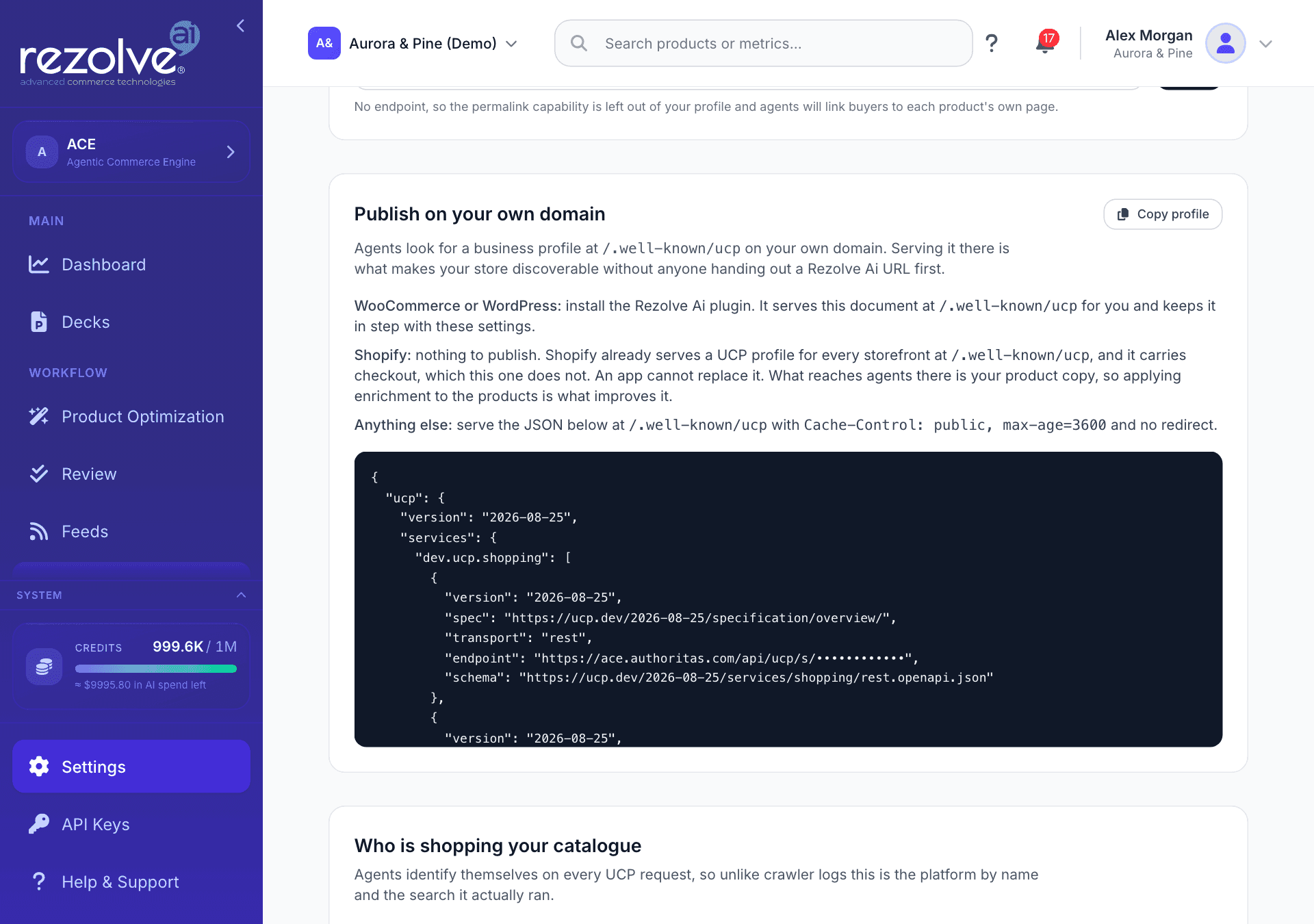
Agents look for a business profile at /.well-known/ucp on a store's own domain. Serving it there is what makes your store discoverable without anyone being handed a Rezolve Ai address first. What you need to do depends on your platform:
- WooCommerce or WordPress. Install the Rezolve Ai plugin (version 4.10.0 or later). It serves the profile at that address for you and keeps it in step with the settings on this screen. There is nothing to paste.
- Shopify. There is nothing to publish. Shopify already serves a UCP profile for every storefront at that address, and it includes checkout, which the Rezolve Ai profile does not. An app cannot replace it. What reaches agents there is your product copy, so applying your approved content to your products is what improves it.
- Anything else. Choose Copy profile and have your developer serve that document at
/.well-known/ucpon your domain, with no redirect and with the caching header shown on the screen.
The profile is shown in full under this section, so you can see exactly what an agent will read.
Agent activity
Who is shopping your catalogue shows which agents have called over the last 30 days. Agents identify themselves on every UCP request, so unlike crawler logs this names the platform and shows the search it ran.
- Agents lists each agent by the address it identified itself with and the number of calls it made. Calls that did not identify an agent are counted on a line of their own.
- Recent searches lists what agents searched for, how many results each search returned, and the date.
Until an agent calls, the section reads "Nothing yet. Activity appears here once an agent calls your endpoints."
In the WordPress plugin
The plugin has no UCP screen of its own. You control everything from this screen in Rezolve Ai, and the plugin follows:
- When you turn delivery on, the plugin starts publishing your profile on your own domain. It learns this from its regular check-in, so you do not paste anything into WordPress.
- Agents can send a shopper to a filled basket: a link with the products already chosen opens your cart with everything in it.
- When you turn delivery off or rotate the token, the site stops publishing the old profile within the hour.
See WordPress plugin.
On Shopify
Your Shopify store is already discoverable by shopping agents through the profile Shopify publishes, and that profile includes checkout. Rezolve Ai's part is the copy those agents read: the product titles, descriptions and other content you approve and apply to your products. See Shopify app.
Catalogue delivery on this screen is separate and optional for a Shopify project. It serves your enriched catalogue directly to a platform that asks for it, without checkout.
What UCP on Rezolve Ai does not do
- It does not take orders or payments. Checkout, cart and order handling stay on your store.
- It does not publish anything while delivery is off.
- It does not send unapproved content. The catalogue carries the copy you have approved.
For developers
The last section of the screen, Building an integration?, points to identity linking. That is a developer feature for software acting on a Rezolve Ai account with the account holder's consent. It has nothing to do with serving your catalogue, and it lives in the developer console, which you open from API Keys in the sidebar. See API keys.
Quick links
Feeds
Enrich your product feeds, publish them to a URL each channel can fetch, and work with Google Merchant Center and Amazon from one place.
Custom Fields and Where Content Goes
Choose which of your store's custom fields Rezolve Ai reads and rewrites, and where on the product page each kind of generated content is placed.