
Experiments
Test your content against a control group, so you know what a change was worth, and keep a record of every result.
An experiment compares new content with content you left alone, over the same period, so you can tell what the content did from what the season or a promotion did. Open Experiments in the sidebar, under Grow.
What an experiment is
Ordinary reporting shows what happened after your content went live. It cannot say why, because seasons, promotions and site changes move the same numbers. An experiment adds a control group: products, or shoppers, deliberately left on your original copy. The difference between the two groups is what your content did.
There are two ways to split:
| Split | How it works | Where it works |
|---|---|---|
| Split by shopper | The same product shows different copy to different shoppers, at the same moment. | A Shopify or WordPress storefront. |
| Split by product | Some products get the new content and some are left unchanged. | Every project, including Amazon, Merchant Center and AI crawler data. |
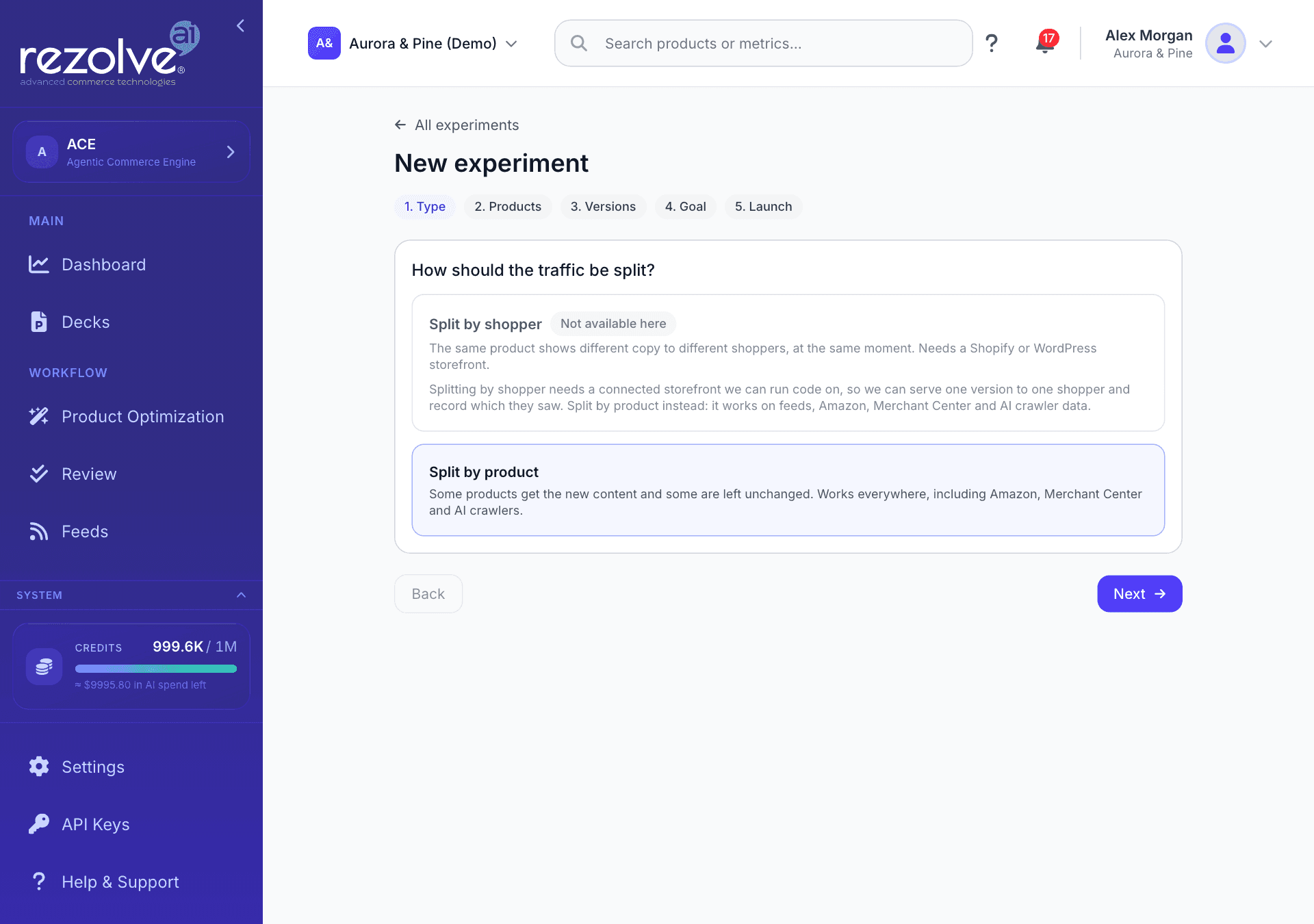
A "Feeds and files" project has no storefront to run code on, so the screen says Splitting by shopper is not available here and offers Split by product only.
What you need first
An experiment can only measure what a traffic source reports. Storefront visits come from one of two switches, and both start switched off:
| Platform | Where to turn it on |
|---|---|
| Shopify | In the Rezolve Ai Shopify app, open Settings and find Storefront analytics, then choose Turn on storefront analytics. If Shopify needs your approval first, the button reads Enable storefront analytics. The app's Dashboard shows the same button in a banner while it is off. |
| WordPress and WooCommerce | In the plugin's Settings, under Visitor pageviews, tick Count visitor pageviews on this site and Send daily pageview and sales totals to my Rezolve Ai project. |
Google Merchant Center, Amazon and the AI crawler watchlist each add history of their own. They are enough for a product split, but not for a shopper split.
The screen leads with the strongest figure it has and says which one that is:
- Visits, when a storefront or Amazon is reporting.
- Shopping clicks, when Google Merchant Center is reporting and no storefront or Amazon source is. A banner says so.
- AI crawler visits, when none of those is reporting. A banner explains that this is what answer engines pulled from your pages, not shopper traffic.
Revenue columns appear only when a source reports sales. They are hidden otherwise, never shown as zero.
The Setup tab
Setup shows Where your numbers come from: one card for each source, marked Reporting or Partial, with Days reported, Pieces seen and the date Range. A source with no days has not reported yet, which is not the same as reporting zero.
When nothing is reporting, Setup lists each connected store with its state (Not measuring, Stopped reporting, Waiting for the first visit or Cannot tell) and the one step that fixes it. A project with no traffic source and no experiments opens on this tab.
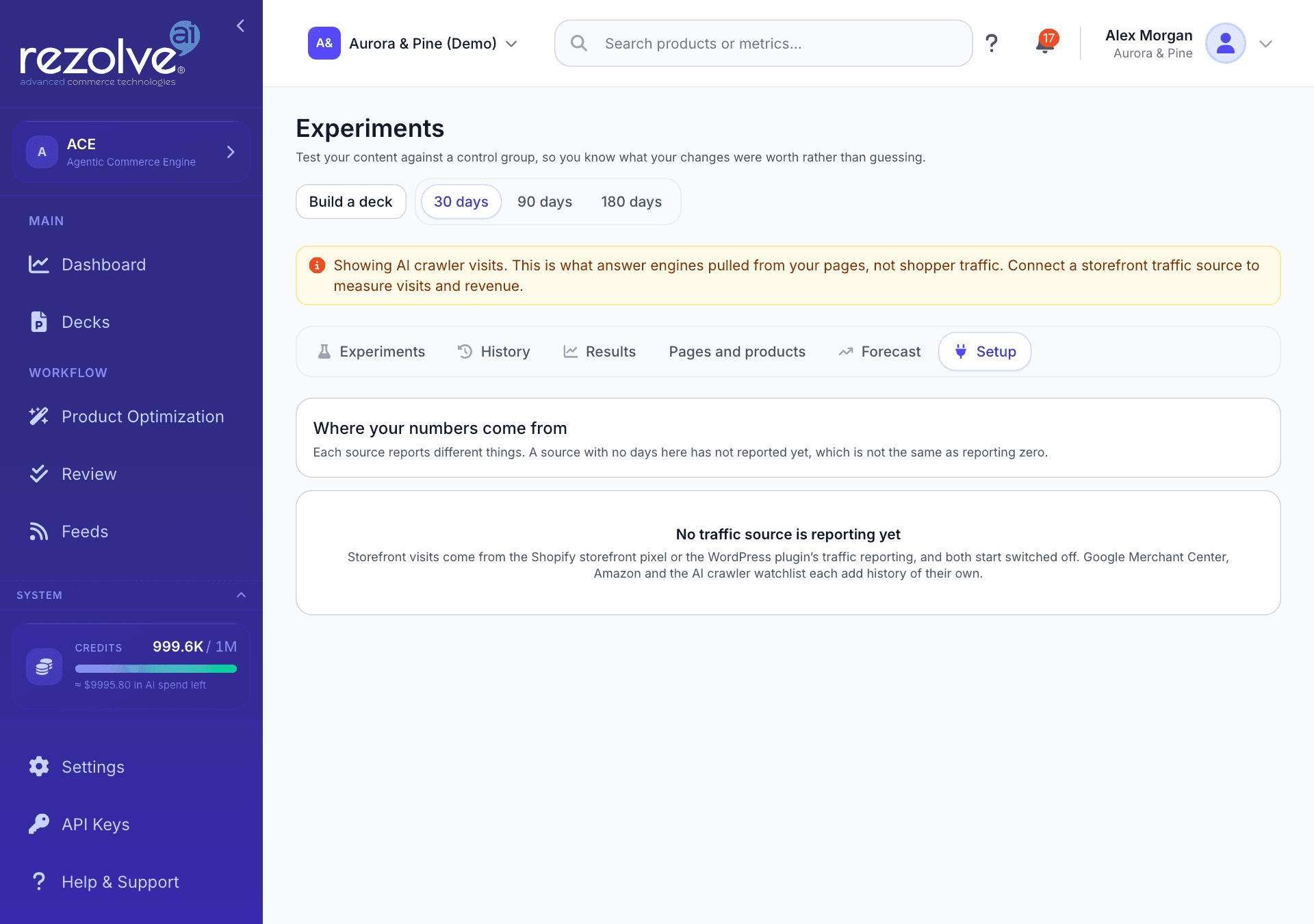
The Experiments screen
| Tab | What it shows |
|---|---|
| Experiments | Your experiments, grouped as In progress and Finished, and the New experiment button. Below the list, Which version won and Which content types pay back summarise results across experiments. |
| History | What testing has been worth so far, and every test with how it ended. |
| Results | Your traffic over time, with a numbered marker on each day enriched content went live. |
| Pages and products | Every page or product a source has reported on, with its trend and the number of content updates. |
| Forecast | A ranked list of what to work on next. |
| Setup | Which traffic sources are reporting. |
The 30 days, 90 days and 180 days control sets the period for Results, Pages and products and Setup.
Build a deck opens the New deck dialog with Experiments already chosen. See Decks.
Create an experiment
On the Experiments tab choose New experiment. The wizard has five steps: Type, Products, Versions, Goal and Launch.
- Type. Under How should the traffic be split?, choose Split by shopper or Split by product. A choice your project cannot use is marked Not available here, with the reason.
- Products. Choose the products the test runs over. See Choosing products.
- Versions. Choose which content is tested and how it is written. See What can be tested.
- Goal. Under What counts as better?, pick the measure the result is read on, then choose a length under Run for: 14, 28, 42, 56 or 90 days. See Goals.
- Launch. Give the experiment a name, check the Split, Products, Combinations and Window it will use, and choose Start experiment.
From the Goal step onwards, a panel checks whether the design can reach an answer. See The design check.
Choosing products
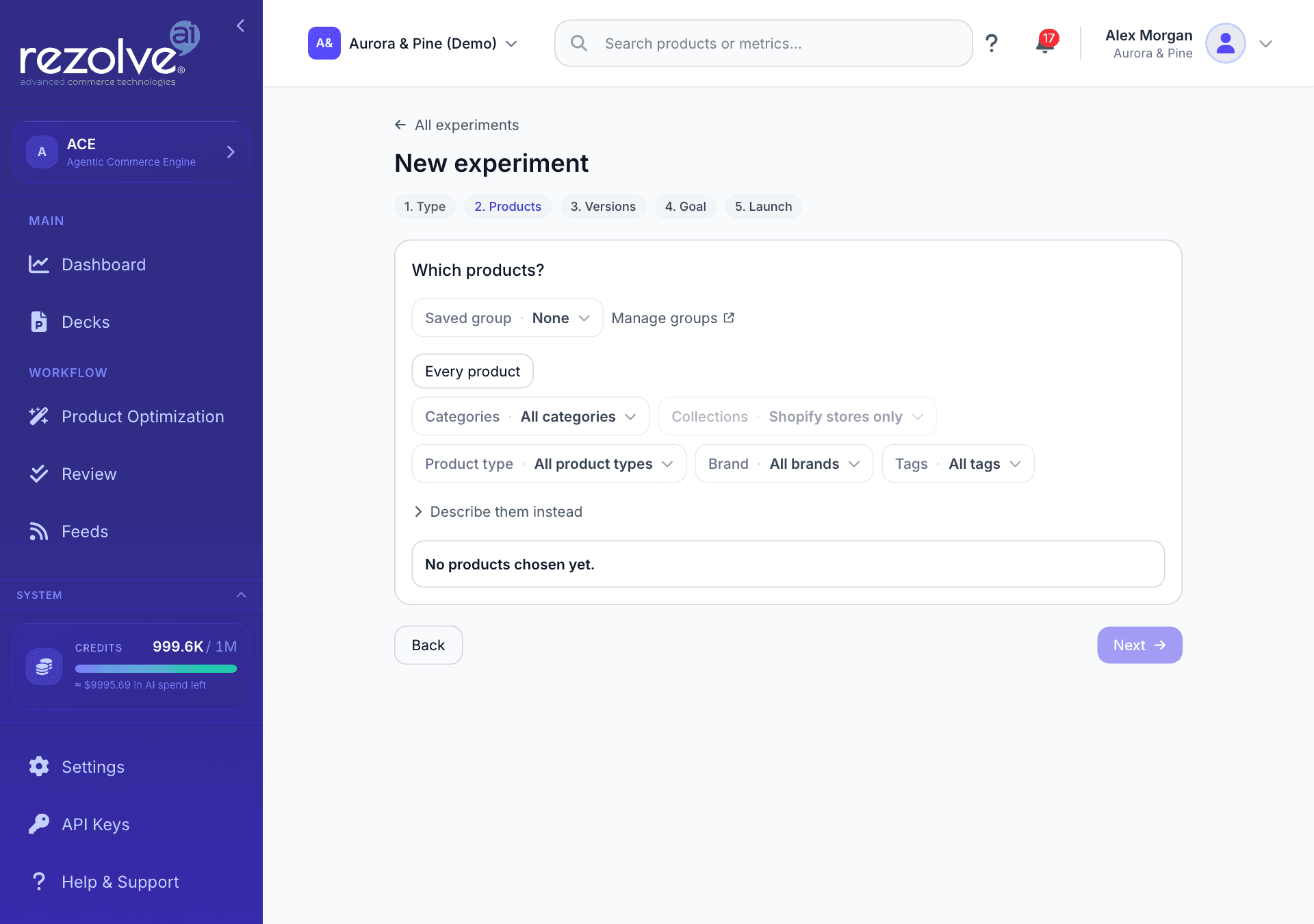
The Products step builds one selection, and every control on it adds to or narrows that selection:
- Saved group. Load a product group you saved earlier. The group is copied in, so you can change the selection without changing the group.
- Every product. Select the whole catalogue. Filtering is off while this is selected.
- Filters. Narrow by Categories, Collections, Product type, Brand or Tags. Collections are for Shopify stores only.
- Describe them instead. Describe the products in your own words and choose Find products. Untick any you do not want, then choose the button that starts Use these to keep the rest. This uses credits.
- Review and adjust. See the products the selection matches, untick any to leave them out, and search your catalogue to add one by hand. You can hand-pick up to 500 products.
A summary under the filters says how many products match. For a product split it also says how many will be held back as the control group, or how many more products you need before a control group is big enough to compare against.
The products are fixed when you start the test. Products added to a category later do not join it.
Saved product groups
To reuse a selection, choose Save as group and name it. Manage groups opens Settings, Product Groups, where you can rename or delete a group.
A group is a saved way of choosing products, not a saved list. It re-reads your catalogue each time it is used, so products added to a category since you saved it are included. The count beside a group's name shows the day it was taken. Experiments already running keep the products they started with, even if you change or delete the group.
What can be tested
In a shopper split, the step asks What should we write more than one way? Only Product description can be swapped for one shopper and not another, so it is the only content on offer. Everything else is listed as Not in a shopper split, with the reason. Choose at least two versions: House style, which is the copy already on your page, and one or more other writing angles.
In a product split, the step asks What should this experiment measure? Each piece of content you include goes live on the products in the test and stays off the ones held back. Include one at a time to measure each on its own: content that goes live together cannot be told apart.
| Content | Shopper split | Product split |
|---|---|---|
| Product description | Yes, in any writing angle | Yes, in any writing angle |
| Meta title and description | No | Yes, in any writing angle |
| IRL scenario cards, Highlights, Product Q&A | No | Yes, in house style |
| Product title, Schema markup, Image alt text, Product attributes | No | Yes, in house style |
| Google Shopping feed, Agentic commerce feed, Microsoft Shopping feed | No | Yes, in house style |
| Internal links | No | No |
Internal links cannot be tested either way, because links added to one product point shoppers at others, including products in the control group.
The writing angles are:
| Angle | What it does |
|---|---|
| House style | Your usual voice and structure, exactly as a normal run would write it. |
| Specification-led | Opens with materials, measurements and concrete facts before any persuasion. |
| Use-case-led | Opens with who it is for and the situation they are buying for. |
| Story-led | Opens with origin, craft or provenance, where the product data supports it. |
A named angle is used on purpose. "Specification-led descriptions won" is a finding you can apply to the next thousand products. "Version B won" is not.
One experiment covers at most 4 pieces of content and at most 8 combinations. Every extra version splits your shoppers further, so each comparison takes longer to settle.
Goals
| Split | Goal | What it measures |
|---|---|---|
| Shopper | Reached checkout | The share of shoppers who reached checkout. |
| Shopper | Revenue per shopper | What each shopper is worth. Needs more traffic than a rate does. |
| Product | Orders | Orders for the products in the test, compared with the products held back. |
| Product | Revenue | Sales value for the products in the test. Cannot be used when sales are in more than one currency. |
| Product | Visits | Shopper sessions on the product page. |
| Product | Shopping clicks | Clicks from Google Merchant Center listings. |
| Product | AI crawler pulls | How often answer engines fetched the page. Needs 21 days to settle. |
A shopper split also offers Watch added to cart as a second check beside the main goal. A version can win on cart adds and lose at checkout, so it is never the main goal.
If your project has nothing reporting for the goal you pick, the experiment is refused before anything is written, and the message says what to connect.
The design check
Before you spend credits, the wizard says whether the design can reach an answer:
| Message | What it means |
|---|---|
| This can be measured | Your traffic is enough to tell a real change from noise over the length you chose. |
| Checked when it launches | A product split is sized against the products you selected when you start it. |
| This will take longer than planned | The design works, but not inside the length you set. You can still start it. |
| Too many versions for your traffic | Fewer versions would let the same test reach an answer. |
| Not enough shopper traffic to measure this | There are too few shoppers behind these pages at any length. Split by product instead. |
| No shopper traffic reported yet | Your storefront is not reporting visits. Turn on the switch described under What you need first. |
| No checkouts measured yet | Shoppers are counted, but there were no checkouts in the last four weeks to compare against. |
| This run is too small to measure | A product split needs more products, or products with more measured activity. |
For a shopper split the panel also draws how shoppers will be split and the smallest change you could spot at each length. When the design cannot work, Start experiment is unavailable.
What happens after you start
Starting an experiment writes the new versions and sends them to Review. Nothing is split until you approve a version and it goes live on your store, so the experiment begins as a Draft. If another content run is already in progress for the project, the experiment is not created and you are asked to wait for that run to finish.
The experiment's page shows five steps. A step that is waiting on you is shown in amber, with the reason underneath.
| Step | What it means |
|---|---|
| Set up | The products are enrolled and the new versions are being written. Nothing is shown to shoppers until you approve them. |
| Live on your store | Waiting for the new versions to be approved in Review and reach your store. In a shopper split, both versions must be live before anything is compared. Your store checks for a new test once a day, so a split usually starts within 24 hours of approval. |
| Collecting | Visits are being counted. The caption shows the day, for example "Day 10 of 28". |
| Enough evidence | Results are computed once a night, and only once enough days have passed for a change to mean something. |
| Decided | There is an answer to act on, or the test is closed. |
An experiment moves through these statuses: Draft, Running, Paused, Control group released, Finished and Abandoned.
The buttons on the page depend on the status:
- Start now (Draft). Available once at least one product has a second version live. You do not have to use it: the experiment starts by itself when the first version goes live.
- Discard (Draft). No shopper has seen anything, and the content already written stays in your review queue.
- Pause and Resume (Running, Paused). While paused, every shopper sees your original copy. Resuming continues the same experiment, and shoppers keep the version they were seeing.
- Stop (Running, Paused). Closes the measurement window for good. Results already computed stay on the page. A stopped experiment cannot be resumed.
Reading the results
The banner at the top of an experiment's page says what to do today:
| Banner | What it means | Button |
|---|---|---|
| Waiting for a second version to go live | Nothing is being split and no days are counting. | None |
| Ready to start | A second version is live on some products. | Start now |
| Still collecting | No clear answer yet. | None |
| This may not settle on its own | At the current traffic, the answer may not become clear. | None |
| A version's name followed by "won" | The version beat your original copy by more than chance explains. | A button to keep that version for everyone |
| Your original copy won | The new version performed worse. That is a real finding. | Finish and keep the original |
| The versions performed the same | Enough shoppers saw each version to rule out a difference worth acting on. | Finish this test |
| This test cannot be trusted yet | One of the checks below is broken, so any difference could be the fault and not the content. | Stop this test |
Keeping a version finishes the test and makes that version the copy every shopper sees. Splitting stops at once, and the new wording reaches your store the next time approved content is applied.
Below the banner, the page shows:
- How each version is doing, or Visits, new content against the control group for a product split.
- When will I know? The range around the difference, narrowing as shoppers arrive. When it stops touching zero, the result can be read.
- Where shoppers drop off and Is this being measured properly?
- What each version is worth, when your store reports order values.
- Can this be trusted? Five things that can be wrong while the numbers still look fine.
- What each version was shown to: counted shoppers and checkouts. These are facts, so they show whether or not a result can be read yet.
- Which way of writing won, when more than one piece of content was tested.
- What it found: every combination compared, including the ones that did not win.
The five checks under Can this be trusted? are:
| Check | What it looks at |
|---|---|
| Split | Whether each version received its share of shoppers. |
| Control group | Whether every control product is still unchanged. On a shopper split this check is called Products. |
| Versions live | Whether at least two versions are live, and whether your store is serving the split. |
| Attribution | Whether every shopper counted could be matched to this test. |
| Measurement | Which traffic sources are reporting inside the test's window. |
Each result carries a label saying how much it can claim:
| Label | What you can conclude |
|---|---|
| Measured against a control group | The difference between the groups is the change your content caused. |
| No clear difference | Against an unchanged control group, this did not move the figure either way. That is a result, not a gap in the data. |
| Too early to read | Not enough days have passed. |
| Not enough traffic | Too little traffic to tell a real change from day-to-day noise. |
| Control group broken | Some control products were updated anyway, so the groups are no longer comparable. |
| Groups were already drifting | The groups were moving apart before the change. Treat the figure as directional. |
| Went live together | This content went live alongside other content on the same products, so its own effect cannot be separated. The result for the whole experiment still stands. |
| Too few went live | Too few products received this content at around the same time to compare. |
| Mixed currencies | Sales were recorded in more than one currency. Measure orders instead. |
| No control group, so not a test result | This shows what happened, not why. |
Words used on these pages
Each experiment page ends with What these words mean:
- Range. The band the true difference is very likely to sit inside. A range that still crosses zero means the version could be better or worse, and more shoppers are needed before you act on it.
- Control group. The products, or the shoppers, deliberately left on your original copy. Without them a rise in sales could be the season, a promotion, or anything else that happened at the same time.
- Even split. Each version should reach roughly the same number of shoppers. When one gets far fewer, something is filtering them, and the comparison is between two different audiences.
- Conclusive. Enough shoppers have seen each version that the difference between them is bigger than the day-to-day noise.
- Not measurable yet. Not the same as no difference. Too little has been counted to say anything either way, which is why no number is shown instead of a zero.
History
History keeps every test and what it found, so you can see what you have already learned before deciding what to test next.
What testing has been worth counts money only from tests that reached a conclusive answer with real order values behind them:
- Banked so far: the yearly value of the decisions you have taken, with the cautious end of the range underneath.
- Running tests, if the current estimate holds: shown separately and not counted in the banked figure.
- Counts of Winners kept, Rollouts avoided, Measured the same and No clear answer.
A test where your original copy won counts as value too: not rolling out the weaker version is what the test was worth.
Every test you have run lists each experiment with its dates, how it ended, the measured change and its range. Search by name, or filter by outcome: New version won, Original won, No difference, Stopped, not measurable, Stopped early, Never started or Discarded. A test whose winner was rolled out is marked Applied.
Choose Add what you learned on any finished test to record a note. With more than one measured result, Everything you have measured, side by side draws them on one axis.
Forecast
Forecast ranks the content most worth enriching next. A chip says how much the ranking rests on:
| Chip | What it means |
|---|---|
| Based on your own results | Figures come from measured results in your own completed runs. Expected revenue is shown. |
| Based on results elsewhere | Figures come from measured results across other stores, because none of your own runs have finished yet. Treat the order as a steer and the sizes as rough. |
| Ranked by opportunity | An order only: the pages with the most traffic and the most room to improve. There are no figures, because nothing has been measured yet. |
What to work on next lists each piece of content, what to add, and where figures are available, Extra visits, Typical uplift and Extra revenue. Select a row to see its projection over the forecast period, with the range you should not be surprised by. Show working opens the inputs behind a row.
A forecast is an expectation on average, not a promise. If the tab reads Nothing to forecast yet, it needs a few weeks of traffic first and fills in by itself.
Results and Pages and products
These two tabs describe what happened. They have no control group, so the Results chart and each piece's own page are marked No control group, so not a test result.
- Results shows your headline figure, Content updates live and Days measured, then Traffic and content changes over time. Numbered markers are the days enriched content went live.
- Pages and products lists each content piece with its figure, trend, number of updates and when it was last seen. Open a piece to see its own history and its figures by source.
Control groups and Review
In a product split, about a fifth of the products you chose are held back as the control group. Their new content is written with everyone else's, and you are charged once, but it must stay off your store while the experiment is open.
Review does not hold control products back for you, and it does not mark which products they are. If content for a control product goes live while the experiment is open, that product is dropped from the comparison, the Control group check reports it, and the result is labelled Control group broken with no figure.
A few details:
- The hold begins when the experiment is created, not when it starts running. It also applies while the experiment is paused.
- Only the content the experiment measures is held. Other content for the same products can go live as usual.
- A control group is held for four weeks. After that the experiment is marked Control group released, and those products can be approved and pushed like any others.
- A shopper split holds no products back. Every product is in the test, and the split happens between shoppers. Its new version is served to a share of shoppers and is not written over the product's own copy until you keep it for everyone.
You can also measure an ordinary optimization run. On the last step of Product Optimization, Run this as an experiment is ticked when the run is large enough to compare. It creates a product split with the same four week control group.
In the Shopify app and the WordPress plugin
Both have their own Experiments screen, where you can start a New experiment and follow the experiments in your project with the same progress captions.
Shopify. A shopper split needs the A/B test app embed turned on in your theme. In the theme editor it is listed as A/B test product description. Without it no shopper is ever assigned a version, and the experiment reports nothing. When it is off, the app says so on the experiment's page and points you to its Schema page, where you can turn it on. If your theme does not use the standard Dawn layout, set the embed's Description block selector to the block that holds your product description. A product split does not need the embed.
WordPress. In the plugin's Settings, under A/B test your product copy, tick Split visitors between versions on this site and Send results to my Rezolve Ai project. The split stores a cookie, so it only runs for visitors who have given consent through your cookie banner. With no consent plugin, nothing is stored and every visitor sees your normal copy. If your theme does not use the standard WooCommerce layout, set Description block selector to the block that holds your product description, or the test will run and change nothing.
See Shopify app and WordPress plugin.
Credits
Two things on this screen use credits: writing the new versions when you start an experiment, and Find products on the Products step. Your original copy is not written again. Checking a design before launch is free. See Credits.