
Feeds API
Create a feed over the API, keep it current from a URL or with signed pushes, publish it to channels, and read back what Rezolve Ai wrote.
The /api/v1/feeds endpoints let a catalogue that is not on Shopify or WooCommerce live in Rezolve Ai without anyone uploading a file. You create a feed, keep its products current, and pull the enriched result back out, either as a file a channel accepts or field by field for your own PIM.
This guide walks through the whole loop. Each step links to its reference page, which has the full schema and a live request panel.
Before you start
You need an API key with the feeds scopes:
| Scope | Endpoints |
|---|---|
feeds:write | Create a feed, set or refresh its source, rotate the ingest secret, change delivery, delete a feed |
feeds:read | List feeds, read a feed, read source and delivery settings, download an export, read enrichments |
feeds:write also satisfies a feeds:read check, and admin satisfies both. These scopes are separate from the enrichment scopes on purpose: a key that only moves catalogue data cannot spend credits or control jobs.
Tick feeds:read and feeds:write under Scopes when you create the key. They are not part of the default selection. See API Keys.
A feed belongs to one project. Pin the key to that project and you never have to name it. With an account-wide key, send projectId when you create the feed. See Project scope.
export ACE_API_KEY=ace_live_your_key_hereNone of the feeds endpoints is charged. See Credits and usage for the one indirect cost, an Autopilot run started by a push.
How the pieces fit
- Create a feed. You get a
feedIdand, by default, a signing secret for pushes. - Fill it. Point it at a file you host and let Rezolve Ai pull it on a schedule, push changed products as they change, or do both.
- Enrich it. Content is generated by Autopilot or from the app, and approved in Review.
- Take the result out. Publish channel URLs for Google, Microsoft, or an agentic commerce console to fetch, download an export yourself, or read the generated content per field.
- Subscribe to the feed webhooks so you pull only when something changed.
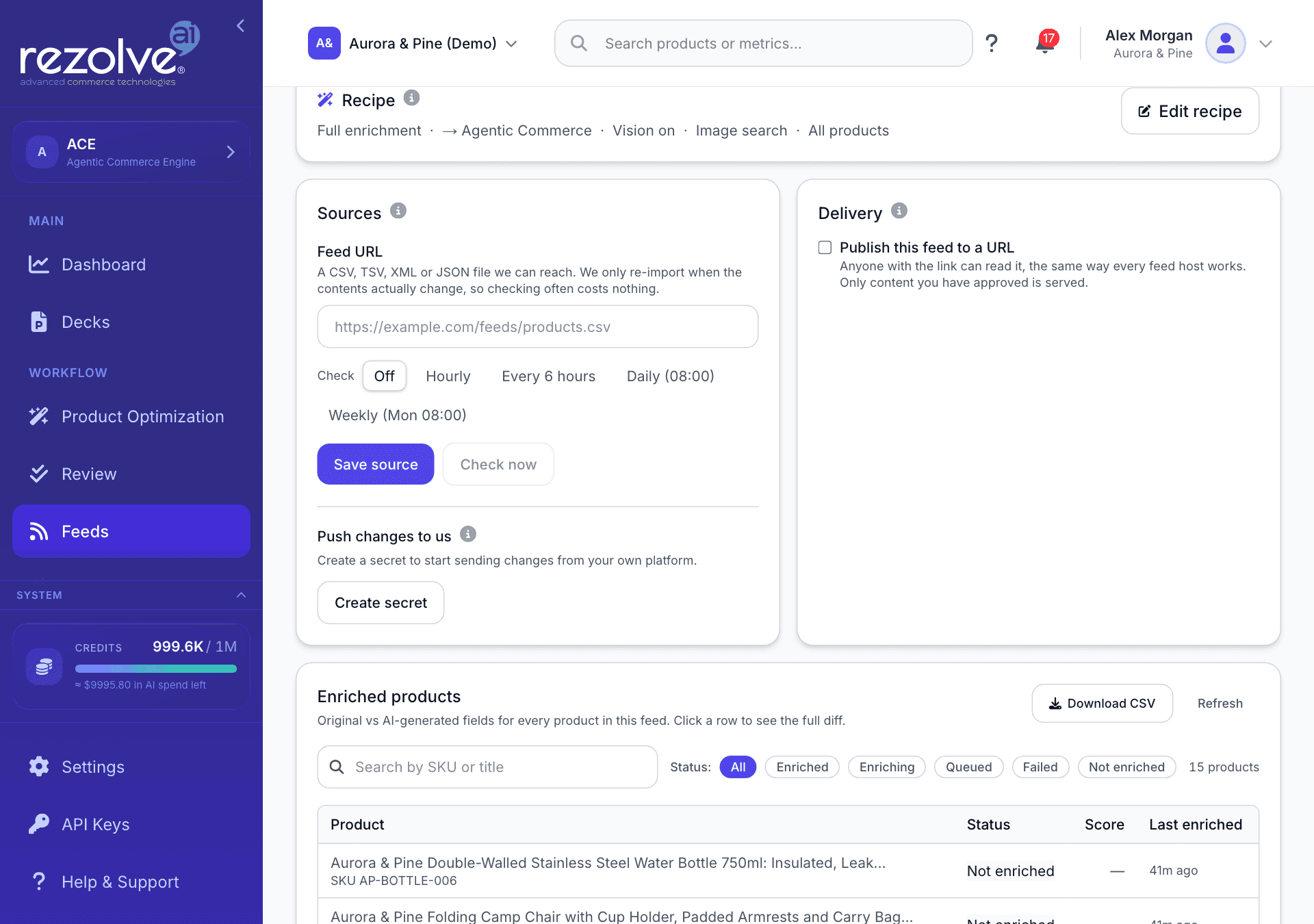
The source and delivery endpoints set the same things as the Sources and Delivery cards on the feed in the app.
Create a feed
POST /api/v1/feeds creates the feed, sets its source, and issues the signing secret in one call. It needs feeds:write.
curl -X POST https://ace.authoritas.com/api/v1/feeds \
  -H "Authorization: Bearer $ACE_API_KEY" \
  -H "Content-Type: application/json" \
  -d '{
    "name": "Main catalogue",
    "source": "url",
    "sourceUrl": "https://example.com/feeds/products.xml",
    "refreshCron": "0 */6 * * *",
    "refreshTimezone": "Europe/London",
    "refreshNow": true
}'| Field | Type | Notes |
|---|---|---|
name | string | Required, up to 200 characters. The feed's display name, and its identity within the project. |
projectId | string | Required for an account-wide key. A pinned key uses its own project. |
source | api or url | Defaults to api, a feed that waits for pushes. url is a feed pulled from a file you host. A feed can do both. |
sourceUrl | string | Required when source is url. Must be an http or https address that is reachable from the public internet. Private and internal addresses are rejected. |
refreshCron | string | A standard cron expression. The schedule must leave at least 30 minutes between runs. |
refreshTimezone | string | The timezone the cron is read in. Defaults to UTC. |
createIngestSecret | boolean | Defaults to true. Issues the secret that signs pushes. |
refreshNow | boolean | Defaults to false. Pulls sourceUrl straight away rather than waiting for the schedule. |
The response is 201 for a new feed:
{
  "data": {
    "feedId": "<feed-id>",
    "projectId": "<project-id>",
    "name": "Main catalogue",
    "source": "url",
    "eventsUrl": "/api/v1/feeds/<feed-id>/events",
    "ingestSecret": "<shown once>",
    "sourceError": null,
    "created": true
  }
}
Keep feedId: every later call addresses the feed by it.
ingestSecret is returned once, in this response only. Store it before you do anything else. If you lose it, the only way to get another is to rotate it.
Two things to know:
- The call is safe to repeat. Creating a feed with a name the project already has returns that feed with status
200and"created": false. Nothing about the feed changes: its source, its schedule, its column mapping and its signing secret all stay as they were, andingestSecretisnull. To change the source, use the next endpoint. To get a new secret, rotate it. sourceErroris not a failure of the whole call. If the URL or schedule was rejected, the feed is still created andsourceErrorsays why. Fix the source with the next endpoint.
Set or replace the source
PUT /api/v1/feeds/{id}/source changes where the feed is pulled from and how often. It needs feeds:write.
curl -X PUT https://ace.authoritas.com/api/v1/feeds/$FEED_ID/source \
  -H "Authorization: Bearer $ACE_API_KEY" \
  -H "Content-Type: application/json" \
-d '{ "sourceUrl": "https://example.com/feeds/products-v2.xml", "refreshCron": "0 3 * * *" }'- A field you leave out is left alone.
- A field you send as
nullis cleared. - Clearing
sourceUrlclears the schedule with it, because a schedule with nothing to fetch could never run. - The URL is checked when you save it, so an unreachable or internal address is refused with
400here rather than failing later.
The response is the feed's source settings, the same shape GET /api/v1/feeds/{id}/source returns (feeds:read):
{
  "data": {
    "feedId": "<feed-id>",
    "sourceType": "url",
    "sourceUrl": "https://example.com/feeds/products-v2.xml",
    "refreshCron": "0 3 * * *",
    "refreshTimezone": "Europe/London",
    "nextRefreshAt": "2026-10-10T02:00:00.000Z",
    "lastRefreshAt": "2026-10-09T02:00:04.000Z",
    "lastRefreshStatus": "unchanged",
    "lastRefreshError": null,
    "ingest": {
      "configured": true,
      "active": true,
      "url": "https://ace.authoritas.com/api/v1/feeds/<feed-id>/events",
      "lastSeenAt": null,
      "lastError": null,
      "eventsReceived": 0,
      "rowsUpserted": 0,
      "rowsDeleted": 0
    }
  }
}
lastRefreshStatus is ingesting when a changed file was fetched and handed to ingestion, unchanged when the file was the same as last time, and failed when the pull did not work, with the reason in lastRefreshError. The ingest block reports on pushes: whether a signing secret exists, when the last push arrived, and running totals.
Scheduled pulls are picked up every 15 minutes, so a refresh starts within about 15 minutes of its scheduled time. A pull of an unchanged file does no further work: nothing is ingested again and nothing is enriched again.
Refresh now, or rotate the secret
POST /api/v1/feeds/{id}/source takes an action. It needs feeds:write.
# Pull the source URL now, even if the file has not changed.
curl -X POST https://ace.authoritas.com/api/v1/feeds/$FEED_ID/source \
  -H "Authorization: Bearer $ACE_API_KEY" \
  -H "Content-Type: application/json" \
  -d '{ "action": "refresh" }'
# => { "data": { "dispatched": true } }

# Issue a new signing secret. It is returned once, as data.secret.
curl -X POST https://ace.authoritas.com/api/v1/feeds/$FEED_ID/source \
  -H "Authorization: Bearer $ACE_API_KEY" \
  -H "Content-Type: application/json" \
  -d '{ "action": "rotate-secret" }'
refresh returns 400 if the feed has no source URL. After rotate-secret, anything still signing with the old secret gets 401.
Push changed products
POST /api/v1/feeds/{id}/events takes only the products that changed. Send it from wherever your platform already knows about changes, for example a webhook worker.
This endpoint is not authenticated with an API key. Each request is signed with the feed's ingest secret:
- Build the JSON body.
- Compute an HMAC-SHA256 of the exact bytes you are about to send, keyed with the ingest secret.
- Send the lowercase hex digest in the
X-Ace-Signatureheader.
BODY='{"upserts":[{"id":"sku-1","title":"Merino base layer","price":79,"currency":"GBP"}],"deletes":["sku-9"]}'
SIG=$(printf '%s' "$BODY" | openssl dgst -sha256 -hmac "$FEED_INGEST_SECRET" | awk '{print $NF}')

curl -X POST "https://ace.authoritas.com/api/v1/feeds/$FEED_ID/events" \
  -H "Content-Type: application/json" \
  -H "X-Ace-Signature: $SIG" \
  -d "$BODY"
The same in Node:
import crypto from "node:crypto";

const body = JSON.stringify({
  upserts: [{ id: "sku-1", title: "Merino base layer", price: 79, currency: "GBP" }],
  deletes: ["sku-9"],
});
const signature = crypto
  .createHmac("sha256", process.env.FEED_INGEST_SECRET)
  .update(body, "utf8")
  .digest("hex");

await fetch(`https://ace.authoritas.com/api/v1/feeds/${feedId}/events`, {
  method: "POST",
  headers: { "Content-Type": "application/json", "X-Ace-Signature": signature },
  body, // send the string you signed, not a re-serialised copy
});
The body has two optional arrays, and needs at least one entry between them:
| Field | Type | Notes |
|---|---|---|
upserts | product[] | Products to create or update. |
deletes | string[] | Your own product ids to remove from this feed. |
A product needs id and title. It can also carry description, category, productType, brand, vendor, price (a number), currency, availability, tags, images (each with src and optional alt), variants (each with optional title, price, sku, inventoryQuantity), and attributes. Keys inside attributes are treated as top-level fields, and any other key you send is kept as extra grounding for generated content.
The response is 200:
{
  "data": {
    "feedId": "<feed-id>",
    "upserted": 1,
    "created": 0,
    "updated": 1,
    "deleted": 1,
    "enrichment": "skipped"
  }
}
Rules worth knowing:
- A push never removes what it does not mention. Products you leave out are untouched. A removal has to be named in
deletes. - At most 1,000 rows per request, counting
upsertsanddeletestogether. A larger request is refused with400, not truncated. Split the batch, or use a scheduled URL refresh for a whole catalogue. - A product id identifies one product in the project. Pushing an id the project already holds updates that product.
- Deletes are safe to repeat. An id that is not in the feed is ignored, and
deletedcounts what was actually removed. enrichmentisdispatchedwhen the push started an Autopilot run for the upserted products, andskippedotherwise. A run starts only when Autopilot is on for the feed, Re-enrich when source data changes is ticked, and Autopilot has content types to write. Pushes that arrive in the same minute share one run.- A failed signature is always
401, with the same answer whether the secret is wrong, the feed has no secret, or the feed does not exist.
Publish to channel URLs
PUT /api/v1/feeds/{id}/delivery turns on hosted feed URLs: stable addresses you register once with a channel, which then fetches the feed on its own schedule. It needs feeds:write.
curl -X PUT https://ace.authoritas.com/api/v1/feeds/$FEED_ID/delivery \
  -H "Authorization: Bearer $ACE_API_KEY" \
  -H "Content-Type: application/json" \
-d '{ "enabled": true, "channels": ["google-shopping", "microsoft-shopping"] }'| Field | Type | Notes |
|---|---|---|
enabled | boolean | Turns delivery on or off. |
channels | string[] | Replaces the list of published channels. Valid values: google-shopping, agentic-commerce, microsoft-shopping, shopify, woocommerce. |
rotateToken | boolean | Issues new URLs. Every URL already registered elsewhere stops working. |
{
  "data": {
    "enabled": true,
    "channels": ["google-shopping", "microsoft-shopping"],
    "urls": {
      "google-shopping": "https://ace.authoritas.com/api/feeds/f/<token>/google-shopping",
      "microsoft-shopping": "https://ace.authoritas.com/api/feeds/f/<token>/microsoft-shopping"
    },
    "availableChannels": ["google-shopping", "agentic-commerce", "microsoft-shopping", "shopify", "woocommerce"]
  }
}
GET /api/v1/feeds/{id}/delivery returns the same shape (feeds:read). urls is null while delivery is off.
About the hosted URLs:
- Possession of the URL is the access control. The URLs need no key, so treat them like a secret you share only with the channel. Use
rotateTokenif one leaks. - Only approved content is served. The file is your catalogue with the content you have approved merged in.
- Google Shopping and Microsoft Shopping URLs serve Google Merchant RSS 2.0 XML by default. Add
?format=to ask for another format the channel supports. - Responses are cached for five minutes, so a change can take that long to show.
- A URL answers
404when delivery is off or the channel is not inchannels.
Download an export
GET /api/v1/feeds/{id}/export returns the feed as the file a channel accepts, with your approved content merged in. It needs feeds:read. The response is the file itself, not a JSON envelope, so it can be piped straight to disk.
curl -s "https://ace.authoritas.com/api/v1/feeds/$FEED_ID/export?channel=google-shopping&format=csv" \
  -H "Authorization: Bearer $ACE_API_KEY" \
  -D headers.txt \
-o google-shopping.csv| Parameter | Notes |
|---|---|
channel | Required. google-shopping, agentic-commerce, microsoft-shopping, shopify, or woocommerce. |
format | json, xml, csv, or tsv. Defaults to the channel's own format. |
rss | 1 for Google Merchant RSS 2.0, the format Merchant Center subscribes to. |
| Channel | Default format | Formats accepted |
|---|---|---|
google-shopping | json | json, xml, csv, tsv |
agentic-commerce | tsv, as the flat file the channel ingests | json, xml, csv, tsv |
microsoft-shopping | csv | csv, tsv |
shopify | csv | csv, tsv, json |
woocommerce | csv | csv, tsv, json |
A format the channel does not support returns 400 with the list it does. Errors use the usual JSON error envelope.
Counts come back as headers so the body stays a clean file:
| Header | Meaning |
|---|---|
X-Ace-Product-Count | Rows in the file. |
X-Ace-Issue-Count | Row-level problems the channel is likely to reject, such as a missing required field. |
X-Ace-Truncated | 1 when the feed holds more than 50,000 products and the file was capped, otherwise 0. |
Read enrichments
GET /api/v1/feeds/{id}/enrichments returns what Rezolve Ai wrote, per product and per field, with the value before and after. Use it when you want to map content into your own PIM instead of taking a channel file. It needs feeds:read.
curl "https://ace.authoritas.com/api/v1/feeds/$FEED_ID/enrichments?since=2026-10-01T00:00:00Z&limit=100" \
-H "Authorization: Bearer $ACE_API_KEY"| Parameter | Notes |
|---|---|
status | approved (the default), pending, or rejected. Selects products that have content in that state. |
since | An ISO 8601 timestamp. Only content changed after it is considered. Use your own watermark. |
limit | 1 to 200, default 50. |
cursor | The nextCursor from the previous page. |
{
  "data": {
    "feedId": "<feed-id>",
    "products": [
      {
        "productId": "sku-1",
        "updatedAt": "2026-10-09T09:12:44.000Z",
        "approvedItems": 2,
        "totalItems": 3,
        "fields": [
          {
            "field": "description",
            "before": "Noise cancelling, 20h battery.",
            "after": "Wireless headphones with active noise cancelling and a 20 hour battery.",
            "approved": true,
            "confidence": 0.9,
            "source": null
          }
        ]
      }
    ]
  },
  "meta": { "cursor": { "limit": 100, "hasMore": true, "nextCursor": "<opaque>" } }
}
How to page it:
- Follow the cursor, not a page number. Pass
nextCursorback ascursoruntilhasMoreisfalse. Content is written while you page, and offset paging would repeat and skip rows. Send the cursor back unchanged: one that cannot be read is refused with400. limitcounts content items, not products. A product has one item per content type, so a page can hold fewer products thanlimit, and the same product can appear on more than one page. Write byproductId.- Check
approvedon each field.fieldslists every field Rezolve Ai has written for the product, whicheverstatusyou asked for. Only a field with"approved": trueis content you have signed off.confidenceruns from 0 to 1. - Keep your own watermark. Store the newest
updatedAtyou have processed and send it assincenext time.updatedAtis when the content on that page last changed, which is the same clocksincereads.
Feed webhooks
Three webhook events tell you when a feed has something new, so you do not have to poll. Subscribe to them like any other event.
| Event | Sent when |
|---|---|
feed.source.refreshed | A pull of the source URL finished, scheduled or requested. |
feed.autopilot.completed | An Autopilot run for the feed finished: its content is written and the quality check has run. |
feed.autopilot.failed | An Autopilot run found products to work on but could not start. |
feed.source.refreshed carries data.feedId and data.kind:
kind | Meaning | Also in data |
|---|---|---|
ingesting | The file changed and was handed to ingestion. | jobId |
unchanged | The file was the same as last time. | via: not-modified or same-content |
skipped | The feed has no source URL. | reason |
An unchanged pull is reported on purpose, so a quiet source can be told apart from a broken one. A pull that fails sends no event: look at lastRefreshStatus and lastRefreshError on the source settings.
The Autopilot events carry:
{
  "event": "feed.autopilot.completed",
  "timestamp": "2026-10-09T10:15:00.000Z",
  "project_id": "<project-id>",
  "data": {
    "feedId": "<feed-id>",
    "runId": "<run-id>",
    "trigger": "scheduled",
    "cause": null,
    "productsEvaluated": 420,
    "productsQueued": 37,
    "skippedApproved": 12,
    "truncated": false,
    "jobIds": ["<job-id>"],
    "error": null,
    "resultsUrl": "/api/v1/feeds/<feed-id>/enrichments?status=approved",
    "approved": 31,
    "held": 6
  }
}triggerisscheduledormanual. A run started by a push ismanualwithcauseset todelta.productsQueuedis how many products the run sent for generation. Onfeed.autopilot.failedit is0anderrorsays why.feed.autopilot.completedis sent when the run has finished: the content is written and Autopilot's quality check has run.approvedis how many items the check approved, which is whatresultsUrlserves straight away.heldis how many it left for a person. Both are0when automatic approval is off for the feed: every item then waits in Review, and reachesresultsUrlas it is approved, so keep reading the enrichments endpoint with yoursincewatermark.feed.autopilot.failedcarries the same fields withoutapprovedandheld.- A run whose generation job stops part way without finishing sends neither event. The run's outcome is on the feed's Autopilot history in the app.
- A run that finds nothing to do, or that is waiting for another run on the project to finish, sends no event.
Other feed endpoints
GET /api/v1/feedslists a project's feeds (feeds:read).GET /api/v1/feeds/{id}returns one feed with its products and warnings (feeds:read).DELETE /api/v1/feeds/{id}deletes a feed (feeds:write). The response returns immediately and the products are removed in the background. A key pinned to a project can delete only that project's feeds.
The first two need projectId unless your key is pinned to a project. See Project scope.
See also
- API Keys for scopes and project pinning
- Webhooks for subscribing and verifying deliveries
- Credits and usage for what an Autopilot run costs
- API Reference for every feed endpoint with its schema